Bring your fundraisers to WordPress
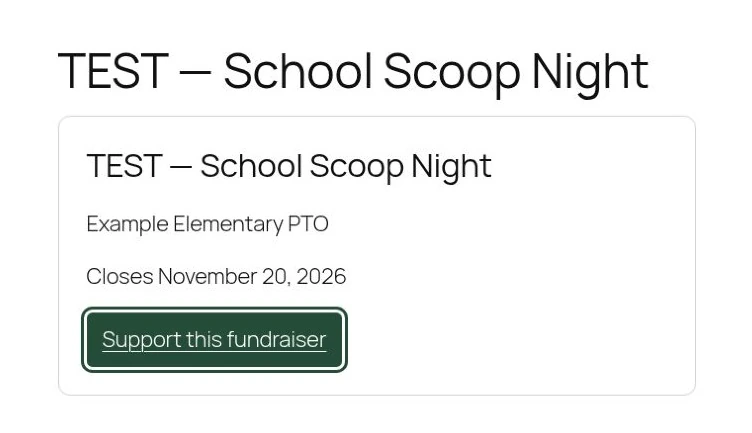
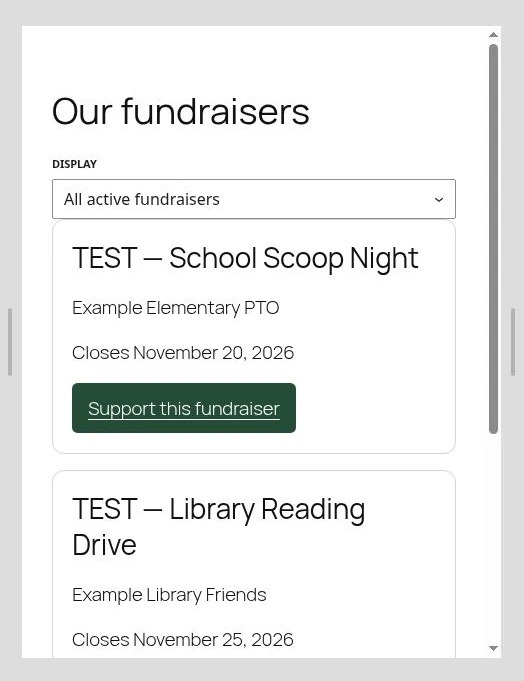
Connect your Giving Scoop account to display one fundraiser or a list of active fundraisers on your WordPress site. Supporters order on Giving Scoop.
The plugin is in pilot. Share your WordPress site URL so we can enable linking for your site.
Set up the plugin
Get your Giving Scoop account
Ice cream shops. Create a free shop account or sign in as a shop owner or manager.
Schools, teams, and nonprofits. Create an organization account, choose your participating ice cream shop, and wait for the shop to approve your account. Already approved? Sign in as an organization.
Install and connect
Once your site is approved for the pilot, use the ZIP we provide. In WordPress, go to Plugins → Add Plugin → Upload Plugin, then install and activate Giving Scoop.
Open Settings → Giving Scoop → Connect your Giving Scoop account. If you sign in or sign up in a new tab, return to the Giving Scoop approval tab and reload it. Select Connect website, then Return to WordPress.
Choose what to show and publish
Choose one fundraiser or All active fundraisers, then select Create draft page. Preview the page, add your own copy if needed, and publish it when you’re ready. You can also add the Giving Scoop Fundraiser block to an existing page.
Requires WordPress 6.5 or later, PHP 7.4 or later, and a site that uses HTTPS.
WordPress plugin FAQ
Do I need a Giving Scoop account?
Yes. Connect as a shop owner, shop manager, or approved organization administrator. You also need administrator access to the WordPress site you want to connect.
Does the plugin create a WordPress page?
Choose Create draft page to make a regular WordPress page containing the fundraiser block. You decide when to publish it. To use a page you already have, insert the Giving Scoop Fundraiser block and select what to display.
Why is my fundraiser missing?
The picker shows public, active fundraisers available to the connected account. Check that the campaign is published in Giving Scoop and that its selling window has started. Ended fundraisers drop out of the active list.
Where do supporters place orders?
The support button opens the fundraiser on Giving Scoop. Giving Scoop handles checkout, payments, and order details. WordPress displays the public campaign information.
How much does the plugin cost?
The plugin is free. Standard Giving Scoop fees apply to orders placed through the platform.
What can I do when my connection expires?
Connections last 30 days. Return to Settings → Giving Scoop to reconnect. Use Disconnect there to revoke access before uninstalling. Your WordPress pages stay in place.